

Introduction
Working with the OneUp Trader program platform daily, I thought I’d share what the dashboard looks like, how it works, and the features it offers. If you’re considering a funded trading program or just curious about how these platforms operate, here’s an honest walkthrough of the OneUp Trader dashboard.
The dashboard is where traders track their progress, monitor risk, and manage their evaluation accounts. Understanding how it works can make a big difference, especially if you’re aiming to pass a funded trading challenge or improve your overall performance.
Who Is the OneUp Trader Dashboard For?
The OneUp Trader dashboard is designed for traders who are either completing an evaluation or managing a funded account.
It’s particularly useful for:
- Traders who want a clear view of their profit targets and drawdown limits
- Beginners who need structured guidance and simple performance tracking
- More experienced traders looking to analyze consistency and improve their metrics
If you rely on data to refine your trading, the dashboard gives you a centralized place to monitor your performance and make better decisions.
Social
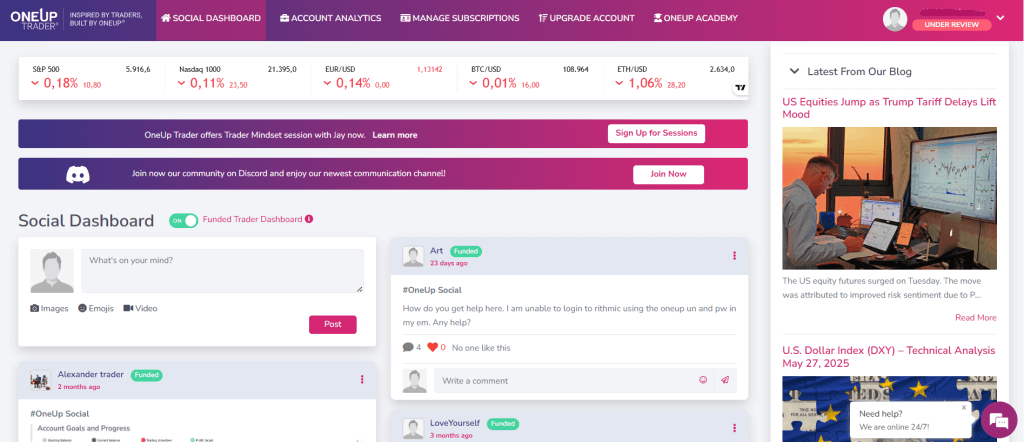
One feature many traders appreciate is the social dashboard. Trading can often feel isolating, so having a space where traders can share both wins and losses adds a human element that not all funded trader programs offer.
Traders regularly post screenshots of their trades, ask questions, and share mindset tips. The support team is also active within the community, and there is a live chat available 24 hours a day, seven days a week. In addition, the platform provides a daily feed of both technical and fundamental analysis.
Overall, it’s a solid community where traders can exchange ideas, learn from each other, and stay engaged with the markets beyond just their own charts.
Account Analytics
Account Analytics
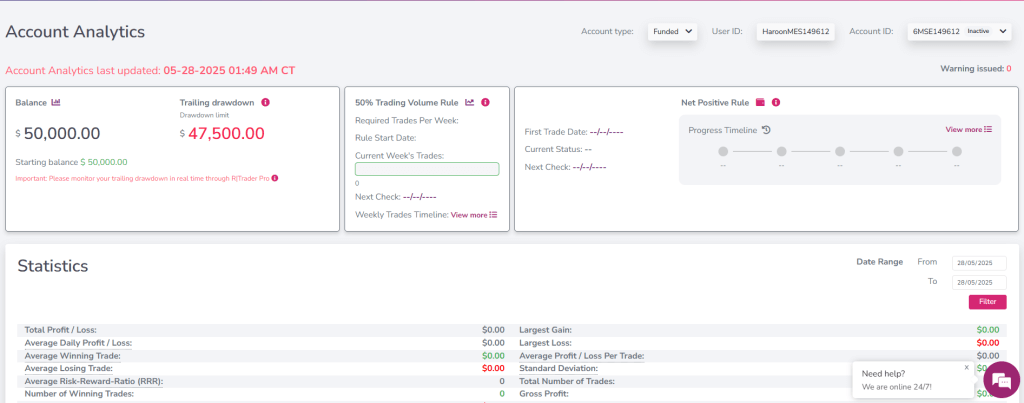
The account analytics section is where most traders will spend the majority of their time. It shows your current balance, how close you are to your drawdown limit, and tracks your overall trading performance.
One of the biggest strengths of this section is how simple and clear it is. Your profit target, current progress, and key risk metrics are all visible in one place, without needing to move between different screens. The visual progress bars make it easy to quickly understand where you stand in relation to your evaluation goals.
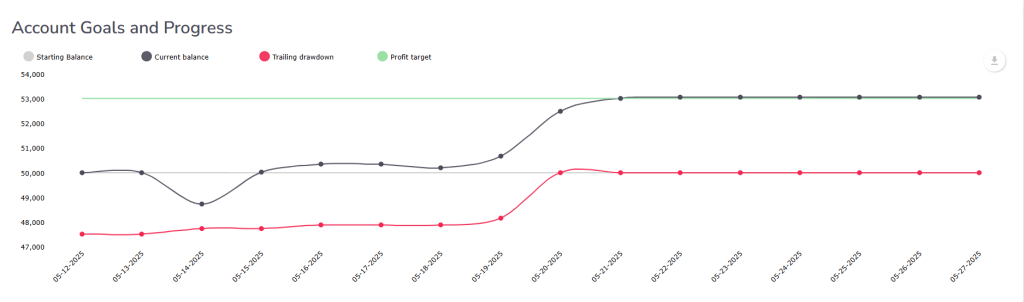
The goals chart provides a timeline view of your account, showing your starting balance, current position, and drawdown levels over time. This makes it easier to spot patterns in your trading, such as consistency, overtrading, or periods of drawdown.
Like any tool, its value depends on how you use the information. Traders who regularly review their data can use this section to improve decision-making and maintain better risk control.
Statistics
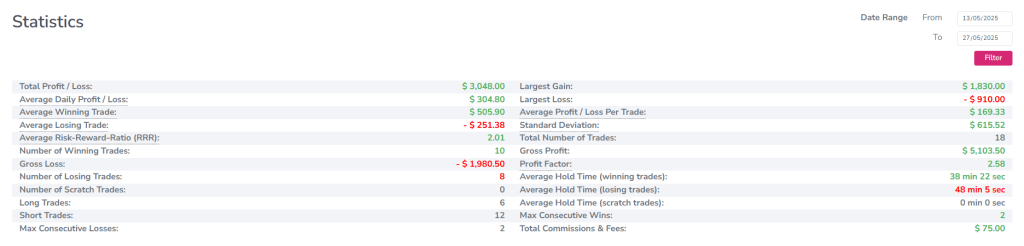
The statistics section breaks down your trading performance into key metrics such as profit factor, risk-reward ratio, win rate, and average hold time.
This is one of the most valuable parts of the dashboard, as it gives traders a clear view of what they are doing well and where they need to improve. Instead of relying on guesswork, you can use real data to evaluate your performance.
For many traders, collecting and calculating this information manually can take a significant amount of time. Having it all available in one place allows you to focus more on refining your strategy rather than tracking numbers.
For example, in the sample account below, a trader shows $3,048 in profit, a 2.01 risk-reward ratio, and a 55% win rate over 18 trades. These metrics provide insight into both consistency and overall performance.
Used properly, this section can help traders identify patterns, improve discipline, and make more informed decisions over time.
The Evaluations
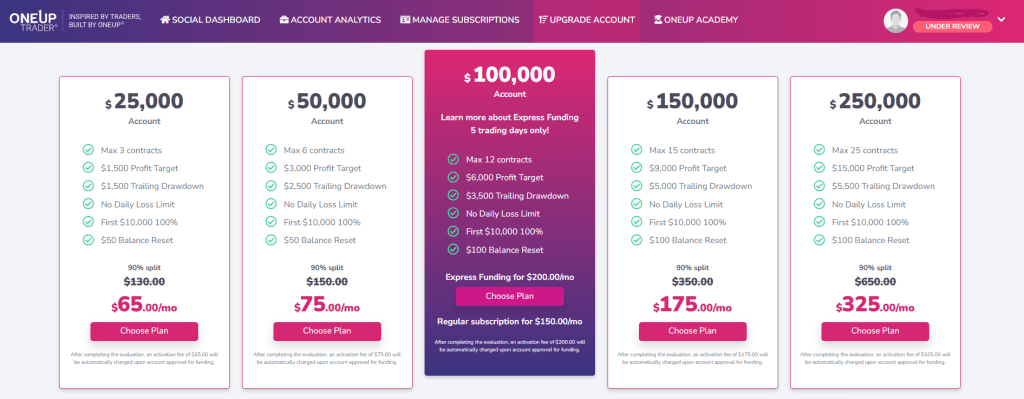
The evaluation and plan selection process is simple and handled directly from the dashboard. Traders can choose from account sizes ranging from $25K to $250K, with clearly defined profit targets and rules.
One of the advantages here is how straightforward everything is. The requirements are easy to understand, and you can quickly see what’s needed to pass the evaluation without digging through multiple pages.
The 50% now, 50% later payment structure, where the remaining balance is only paid after successfully passing the evaluation, makes it more accessible for traders who don’t want to commit a large upfront cost.
Overall, the process is designed to be simple and transparent, allowing traders to focus more on performance rather than navigating complicated rules or systems.
Pros and Cons of the OneUp Trader Dashboard
Pros:
- Clean and easy-to-use interface
- Clear visibility of profit targets and drawdown limits
- Strong analytics and performance tracking
- Active community with social features
- 24/7 live chat support
Cons:
- Limited customization options for advanced users
- May feel basic for highly experienced traders
- Analytics are only useful if actively reviewed and applied
Frequently Asked Questions
What does the OneUp Trader dashboard track?
The dashboard tracks your account balance, drawdown limits, profit targets, and detailed performance metrics such as win rate, risk-reward ratio, and trade history.
Is the OneUp Trader dashboard beginner-friendly?
Yes, the dashboard is designed to be simple and easy to navigate, making it suitable for both beginner and experienced traders.
Can you track your trading performance easily?
Yes, the analytics and statistics sections make it easy to monitor your progress and identify areas where you can improve.
Is the OneUp Trader dashboard available 24/7?
Yes, the platform is accessible at all times, and it also includes 24/7 live chat support for assistance.
Does the dashboard help improve trading performance?
It can, as long as traders actively review and apply the data provided. The dashboard highlights key metrics that can help identify strengths and weaknesses.
The Bottom Line
The OneUp Trader dashboard does what it needs to do without unnecessary complexity. It tracks the key metrics, provides the data traders actually use, and includes community features that add real value.
It’s not overloaded with features, which can be a good thing. The simplicity makes it easy to focus on what matters most: tracking performance, managing risk, and improving consistency over time.
Is it perfect? No platform is. More advanced traders may want deeper customization or additional tools, but for most users, the dashboard provides everything needed to stay on top of their trading.
If you’re evaluating funded trading programs, the dashboard experience is worth considering alongside rules, pricing, and profit splits. After all, it’s something you’ll be using every day, and having a clear, functional interface can make a real difference.
Based on observations from working with the platform and trader feedback. As always, only risk what you can afford to lose in any trading venture.